Showing posts with label XML. Show all posts

Saturday, 14 September 2019

StockReader: White and Black Lists

As I mentioned in earlier blog posts, I want to have a black list and a white list for combinations of expected name and returned names. Now, I got that code working.

An XML file lists all valid combinations (white list) and invalid combinations (black list). When the program is started, that XML file is opened and the lists are read into two dictionaries.

When the program finds a new stock record, it will query the class nameChecker for the combination of the expected name and the returned name. The result will be one of the following:

  • Found in white list: The record can be added to the database
  • Found in black list: The record is faulty and will be discarded.
  • Found in neither white or black list: The combination needs to be assessed by the user manually. The record won't be added to the database. Instead, a proposal xml string is printed to the console when the scanning of records is done.

One of the few methods that is properly commented.
I really need to refactor my code.
The output can be copied into the XML file for the next iteration:

This means that there will be a lot of manual work initially. Once the lists are updated, unknown mismatches will be less frequent.

The current version of the web scraper builds the list of stocks dynamically and mismatches should be very unlikely.

Side Note: I'm focusing more on programming tasks at work. Therefore, I'll have a slower pace on my spare time projects and sometimes, I'll update the blog every second week, instead of every week.

Saturday, 31 August 2019

StockAnalyzer: Adding XML Reader to the Program

I've created a separate page for StockReader and StockAnalyzer, with a short summary of the programs. In this blog post, I'll use XML and C# dictionaries to verify that the stock names are correct for the stock records.

When feeding the stock records from the csv files, I need to verify whether the stock name I queried (the first string) matches the actual stock record that I got (the second string).

As I mentioned in my last post, I'll have three lists of valid, invalid and unknown combinations in a XML file. The program will read that file and populate corresponding dictionaries.

When the program reads a stock record, it will look for the stock names in the dictionaries.
  • If it is found in the white list, that stock record can be added to the database.
  • If it is found in the black list, that stock record is ignored.
  • Otherwise, the program will print a recommended xml tag. The user can decide on whether to add that tag to the white or black list.
The user will edit the XML file and move combinations from the gray list to the black or white list manually.

XMLReader vs XMLDocument in C#
XMLReader is a read-only representation of the XMLDocument. The reader requires more code but is less memory consuming. I've decided to use the XML


New Class: NameChecker
The name checking will be handled in a separate class, that is called from fileParser. I'll implement it in the next post.

Mapping the Wanted Stock Name to the fetched Stock Name
In C#, there is no mapping from value to key in dictionaries. Key to value mappings are smooth. Therefore, searching for the key will be time consuming.

I'll use the dictionaries to search for the key (the fetched values). This will give a list of values that represent the wanted values (most of the cases one value).

Saturday, 17 August 2019

StockAnalyzer: Handling Stock Name Mismathes

One early flaw of the earlier versions of my webscraper was that it used hard coded links when retrieving the stock data. The links were based on hard coded numbers and I needed a safeguard check to detect if those numbers changed.

The program took the first Name ("Eniro") as the stock name. It used the corresponding numbers (869, 2398 and 46100341) to build three URL strings to fetch the stock data.

For that reason, I had the stock name as the two first entries: The first name is the stock that I want to fetch and the second name is the stock that was actually collected. Ideally, the names matched each other, but there are several mismatches.

I need to verify the stock records before adding them to the database. One check will be to see whether the first string is "---Void---" or not. That string was a placeholder and that record shall be discarded.


Further, I need to check whether the stock data I have really matches the stock name or not. To do this, I'll use a XML file that contains three lists:
  • White List for the allowed combinations of names,
  • Grey List for the combinations of names that hasn't been verified by the user yet and
  • Black List for the illegal combinations of names (these records will be ignored by the program).


A lesson learnt from this is to make sure that the web scraped data is in a good shape already when scraping. The next blog post will cover some XML topics for CSharp.

Saturday, 16 February 2019

TravelTimeCalculator: Adding a Preference Activity

My app can now query Google Directions for the best travel mode with respect to duration and present that on a map, when the user is tapping on it.

I want to let the user define what the best travel mode is, by selecting some parameters.

There will be three options for estimating the best travel mode:

  • Duration
  • Distance
  • Cost
Cost will consider the following parameters:
  • Travel duration and distance
  • Start and stop time (unlocking and locking the bike, finding a parking space for the car)
  • Travel costs per km (fuel cost and vehicle depreciation)
  • Travel costs per travel (transit ticket price)
  • Emissions (CO2e per km)
  • Time cost (SEK/s)
  • Environmental cost (SEK/CO2e
The app will calculate the cost for each travel mode:

For transit and driving, I'll use the estimates from klimatsmart semester (climate-smart vacation) to estimate the emissions per person-kilometer.

Adding a Settings Activity to the App
Users will need to change the settings above. I started by adding an activity to the project:

Specify the parent class

A couple of new files are created automatically, with the necessary code to make the new activity appear. Now, I need to understand the anatomy of the new files.

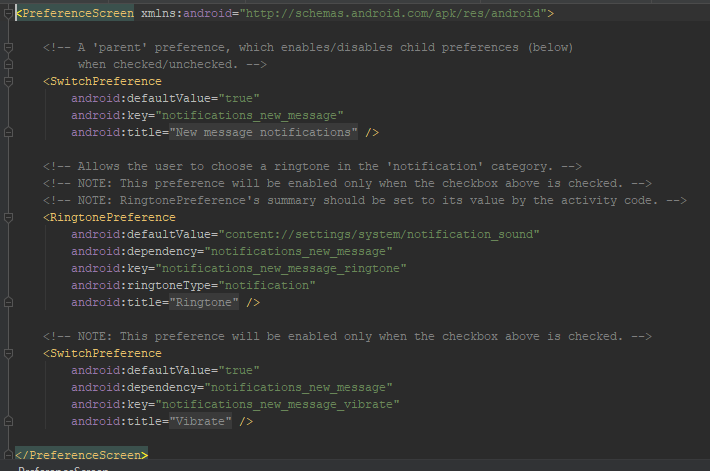
The preferences are defined in xml files in the java/res/xml folder
Currently, the code is autogenerated. The settings are divided into three submenus.
Preferences for ringtones are located in a submenu:

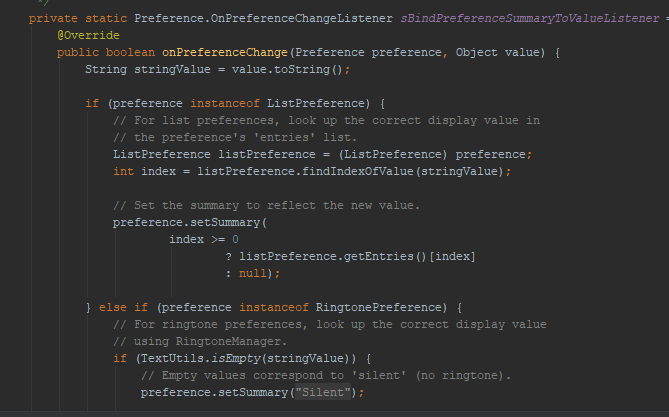
A listener is declared in the SettingsActivity class

The settings are designed in the XML file and accessed from the SettingsActivity class.

In the next blog post, I will explore the settings and its listeners further.

Thursday, 29 October 2015

TrafficControl: How KML Files Represent Coordinates

In two blog posts: Continuing Blog and TrafficControl: Looking into Javascript, I discussed the KML file that contains the coordinates tracks and stations in Skåne.

That KML file is essentially a XML file and contains stations and tracks as placemarks:

The coordinates for Lund_C are highlighted.

The coordinates for Stångby are highlighted
The tracks are represented as an array of coordinates:

The coordinate for the track from Lund C to Stångby
The track is shown below.

The track dLunStaN leaves from Lund_C and arrices at Stangby.
I created a script that mapped the start and end of each track to the closest station. In this case, Lund C and Stånby were connected to LunStaN.

For this example, the script created three eight lines of code that will be used in TrafficControl:
ADD STATION Lund_C
ADD STATION Stångby
ADD TRACK dLun-StaN 5159
ADD TRACK dLun-StaS 5159
CONNECT TRACK dLun-StaN FROM Lund_C TO Stångby WITH PRIORITY
CONNECT TRACK dLun-StaN FROM Stångby TO Lund_C
CONNECT TRACK dLun-StaS FROM Stångby TO Lund_C WITH PRIORITY

The "WITH PRIORITY" tag indicates that the track will have the prioritized direction from Lund_C to Stångby.

The naming convention of the tracks is for example: dCph-JHylWW
  • d indicates that the track is a double track (create a corresponding track in the eastbound direction). 
  • Cph indicates the first station is a station.
  • JHylW is the name of the end junction. J indicates junction and W indicates the location related to Hyllie.
  • W is the direction of the track.

I'll discuss the algorithm in detail in a future blog post.