Showing posts with label Database. Show all posts

Saturday, 12 September 2020

StockPredictor: Selecting Algorithm and Some Design Considerations

This is the third part of the stock project, where I will use the validated data to train a machine learning system to predict the performance of a stock based on the data that was available at the date of the stock record.

The first step is to make some design considerations for the algorithm. The earliest program will only look at the current stock record for features (X) and the results (y) will be the daily change of the stock.

If I select the prediction window to one week, one example of features and results would be:


The results from a query in the database will look like this:

The X data can consist of values of P, P/E, P/C, Yield, PMI, RSI and the time to/since the last dividend. The y data for the stock record of 2018-10-31 will be the change (%) divided by the days: 
The daily increase of ABB's stock price was 0,054% during one week in November, 2018.
It would have been more mathematically correct to take the seventh
root of the quota, but this time I'll prefer simplicity.

For training data to be useful, there must be a price record in the future that can be used ad y.

I'm saving the data to a huge panda dataframe (the process of populating it from the database (with some necessary processing) takes ~35 minutes. To avoid repeating this cumbersome process every time, I save the dataframe to a csv file, that can be used directly to train the machine learning algorithm. Loading that file takes less than a second.

The Data Set
I suspect that some of the data are highly correlated to each other. For example, Price, P/E and P/C are correlated in the short-term, since earnings and capital per share seldom changes. 

Sometimes, the data contains zeros or null values. 

Regression or Neural Networks

Both regression and neural networks has some pros for this dataset. 

Linear regression

A linear regression would be intuitive for predicting the change in stock price. But there are some zeros in the underlying data that I fear will skew the results. It also seems to be tricky to handle XOR relationships between features. 

Multi-Layer Neural Networks can model complex relationships such as XOR relations and zeroed records. I'll start with this one initially. The

SciKit-Learn

Sklearn has a neural-network-ish regressor that I will investigate.


Saturday, 11 January 2020

2019 in Retrospect


This year, I've had some progress on my pet projects. The progress rate was slower in Q4 as we have bought a house. We'll move there in 2020.

Maintaining a house will require some work and learning activities. I expect that the pace of my pet projects will be slower than before.

2019
  • TrafficControl (C++ / Qt) - Paused
    • No work on this project in 2019.
  • StockReader/StockAnalyzer (C# / SQL / MSVC) - Current focus
    • Creating a C# program that scans a folder for result files, extract stock records and parses the data to a database. I've got some experience with Microsoft Visual Studio by now and I'm still learning...
    • Next step will be to fix issues with data conversion to SQL
    • After that, I'll explore some Machine Learning algorithms and check if I can predict stock price changes based on key numbers.
  • ApartmentPredictor (Python) - Done
    • A Python script that made Linear Regression Analysis of past apartment prices in an area. The predictions were based on the apartment size and the monthly cost. 
  • Machine Learning Course at Stanford (Octave / Matlab)  - Done
    • I successfully attended and finished the course in Machine Learning from Stanford University.
    • I applied some machine learning for a pet project for a friend. The simulations indicated that the result was random to a very high degree,
  • TravelTimeCalculator (Java / SQLite / Android Studio) - Done
    • I've completed the project now. TravelTimeCalculator allows the user to compare travel time/cost between several positions on a map. They can also customize the travel cost to consider both travel time, economic costs and environmental cost.


  • Work (C / Python / 4G / 5G) At work, I've focused on test and some coding for 5G with focus on antenna calibration.
To Do in 2020:
Prio 1: The New House!
Prio 2: StockReader/StockAnalyzer

Saturday, 8 June 2019

StockAnalyzer: Adding Code

Now, it is time to add some code to the program.

Database
The database is controlled from dbParser.
I added some code for printing the contents of the database to the console and also code for clearing all data from the database.
Code for printing contents of database to console.
Code for deleting all records of the database.
The first step is to delete all records from the StockTable.
The second step is to set the identity counter to zero.
Scanning for Files
I have saved my input data in a local folder on my computer. Thus, it is convenient for me to have that folder as the default folder. However, I want to avoid assuming that that folder exists - someone might fork my repo and install it on another system.

To handle this, the program will check whether my folder exists. If it doesn't, it will use the user's document folder instead.
I'll clean up this form soon.
When the user presses the "Scan to Database" button, the program will scan for the files in the class scanFolder. First, I need a list of all files in the current folder. Once I have that file list, I will iterate over it and scan only the files that are in the time interval.
In the next blog post, I'll make the program select which files to analyze and also start to add records to the database.

Saturday, 22 December 2018

TravelTimeCalculator: Further Improvements to the Database (TDD)

Test: Check if dbHelper can add information to an existing entry (continued)
Currently, it is only possible to add information to the database if there is no entry at all for the coordinates.

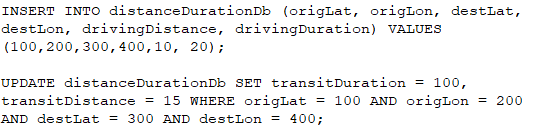
If I add a direction for the mode "WALKING" to an empty SQLite database using INSERT, it will look like this:
There is data only for the mode "WALKING" in this entry. The other ones are "null".
If I'd like to fill in information about the mode "DRIVING" using INSERT for the same coordinate, the constraint that I used to define the database will prevent me from doing that.

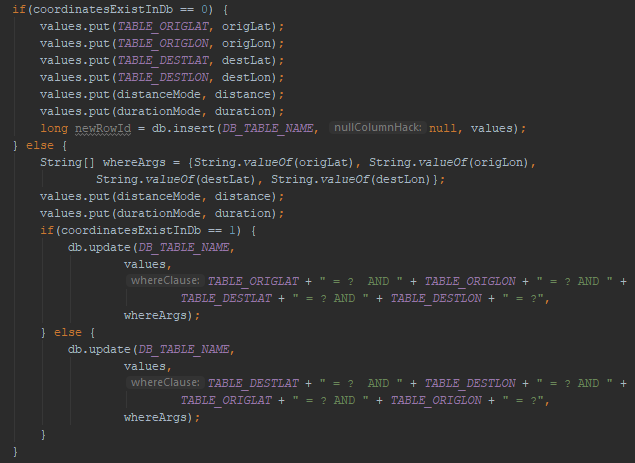
Instead, I need to use the SQLite "UPDATE" command when there is already entries for that direction. 

Using the method checkIfCoordinateExist, to decide whether to insert or update entries, with or without reversed coordinates, I was able to add directions in reversed diretions.


With those changes, I was able to pass the new TDD test case.

Test: Get Duration and Distance for All Modes for Coordinates
I made similar changes in the code to be able to get reversed directions for all modes.

Finally, I added a method for printing the contents of the database to the console.

Next step
Soon, I'll be able to continue working with the app itself, instead of focusing on the database. 

First, I need to define which coordinates the app should scan for, given the center and zoom of the current map view.

Saturday, 15 December 2018

TravelTimeCalculator: Improving Database

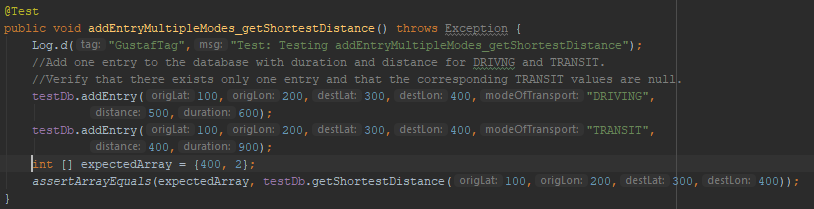
After being able to add a simple entry to the database, I want to add more modes of transport to the same origin and destination pair.

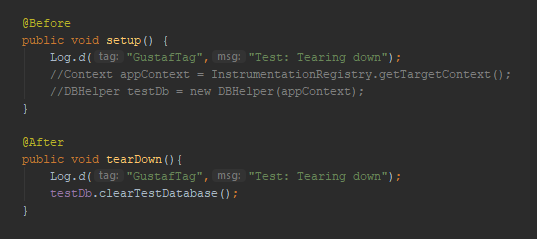
The first thing I saw was that the database isn't cleared automatically between the two test cases. I needed to add a method for tearing down the database between the test cases.

The setup method doesn't do anything for now.
The tearDown method clears the database.
If needed, I'll add more code later.

Test: Testing reversed directions

In order to reduce the number of Google Directions Queries that are sent, I'll assume that the transport durations and distances are similar in both directions. For example, I assume that the duration/distance between Trafalgar Square and Picadilly Circus in London is the same in both directions. When checking on Google Maps, it is not exactly the same, but close enough.

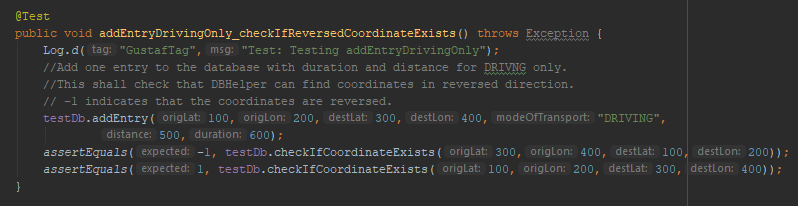
The test case looks like this:
The first test checks
In dbHelper, a query is first done in the intended direction (Trafalgar Square to Picadilly Circus) . If no entries are found, a query is done in the other direction (Picadilly Circus to Trafalgar Square). If nothing is found after that, 0 is returned.

Test: Check if dbHelper can add information to an existing entry.
Currently, dbHelper can add one entry for one mode. When trying to add a second entry for the same coordinates but with different mode, the database rejects that query since there is already an entry.

The second entry is currently rejected, since there is already one row in the database. 
The dbHelper needs to check if the entry exists. If it does, it shall run an UPDATE command, otherwise it shall INSERT into the database. I'll describe this in the next blog post.

Saturday, 17 November 2018

TravelTimeCalculator: Defining a SQLite Database for Directions

In order to reduce the number of requests to Google Directions API for directions, my app will need to save and reuse old queries to an Android SQLite database.

A SQLite query for directions will handle the following information:
  • Origin Latitude 
  • Origin Longitude 
  • Destination Latitude
  • Destination Longitude
  • The mode of transportation (DRIVING, TRANSIT, WALKING, BICYCLE)
  • Travel Time in seconds
  • Travel Duration in meters
The app will search for coordinates to find existing queries. In order to reduce the possible coordinates to a feasible number of coordinates, I'll cast the coordinates to integers, after multiplying by 1000. 

This means that the coordinate (13.00213121, 55.432923) will be converted to (13002, 55433). The highest rounded error will be: 

After querying, the database will be populated with data for recently used directions.

Whenether the user makes a new query, the database will start by finding all results that has origin and destination coordinates that are matching the query. The swapped coordinates will also count as hits. The query (13012,55605, 13002, 55605) shall find the directions above.

I'll use the Android SQLite tutorial as inspiration for the database.


One entry to the database might be


13002, 55605, 13012, 55605, "DRIVING", 240, 2000.

Those values that aren't defined will have the default value "NULL".