Showing posts with label SQL Server. StockAnalyzer. Show all posts

Saturday, 12 September 2020

StockPredictor: Selecting Algorithm and Some Design Considerations

This is the third part of the stock project, where I will use the validated data to train a machine learning system to predict the performance of a stock based on the data that was available at the date of the stock record.

The first step is to make some design considerations for the algorithm. The earliest program will only look at the current stock record for features (X) and the results (y) will be the daily change of the stock.

If I select the prediction window to one week, one example of features and results would be:


The results from a query in the database will look like this:

The X data can consist of values of P, P/E, P/C, Yield, PMI, RSI and the time to/since the last dividend. The y data for the stock record of 2018-10-31 will be the change (%) divided by the days: 
The daily increase of ABB's stock price was 0,054% during one week in November, 2018.
It would have been more mathematically correct to take the seventh
root of the quota, but this time I'll prefer simplicity.

For training data to be useful, there must be a price record in the future that can be used ad y.

I'm saving the data to a huge panda dataframe (the process of populating it from the database (with some necessary processing) takes ~35 minutes. To avoid repeating this cumbersome process every time, I save the dataframe to a csv file, that can be used directly to train the machine learning algorithm. Loading that file takes less than a second.

The Data Set
I suspect that some of the data are highly correlated to each other. For example, Price, P/E and P/C are correlated in the short-term, since earnings and capital per share seldom changes. 

Sometimes, the data contains zeros or null values. 

Regression or Neural Networks

Both regression and neural networks has some pros for this dataset. 

Linear regression

A linear regression would be intuitive for predicting the change in stock price. But there are some zeros in the underlying data that I fear will skew the results. It also seems to be tricky to handle XOR relationships between features. 

Multi-Layer Neural Networks can model complex relationships such as XOR relations and zeroed records. I'll start with this one initially. The

SciKit-Learn

Sklearn has a neural-network-ish regressor that I will investigate.


Saturday, 7 March 2020

StockAnalyzer: Enabling SQL Server Locally and Accessing it From Python

I've had some challenges when attempting to connect a NodeJS app to a MS SQL database on my computer. To trouble-shoot, I'll start with connecting a python script instead to a database.


  1. First, I need to make sure that the SQL server  is up and running.
  2. After that, I'll test the connection using Python or an UDL file.
  3. If that works, I'll connect using NodeJS
Step 1: SQL Server
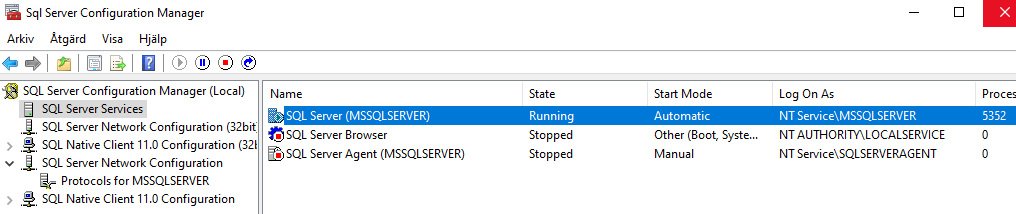
From the app Sql Server Configuration Manager, SQL Server is running on my machine.
SQL Server Browser isn't active however. That app provides information about SQL resources and SQL server instances on this computer. It listens to UDP port 1434 and allows several different SQL Server instances on the same port.

If TCP/IP is enabled for  a SQL server, that server is assigned to a port. In addition, it is possible to make the server listen to a specific pipe. 

SQL Server reads out all active instances of the computer and notes their corresponding ports and pipes.

It is possible to reach SQL servers without the SQL Server Browser running on the host, but then the port (and pipe) needs to be specified. It may be necessary to open up a couple of ports in the firewall, such as 1433 and 1434.

First Attempt to Connect to SQL Server Using Python:

The script can't find the SQL server.
Second Attempt to Connect to SQL Server Using Python:

Now, the script can find the SQL server but it can't find the data source.
Now, the script seems to have come a bit further. It doesn't complain about not finding SQL Server anymore. Instead, it says that it can't find the data source. The reason is most likely because I've specified the wrong version of ODBC Driver. 

Third Attempt to Connect to SQL Server Using Python: 
This time I'll specify the actual version of SQL driver: 17.

Yay!

Now, I know that the SQL Server is up and running on my local computer, and I know how to access it from Python. The next step is to connect using a NodeJS script. I'll explore that in the next blog post.