Showing posts with label Github. Show all posts

Saturday, 1 October 2022

Qt: Upgrading from Qt 5.12.2 to Qt 6.3

After a couple of years exploring Machine Learning, IoT and Python, I'll return to TrafficControl. The current version of my project is Qt 5.12 - more than three years old. 

Upgrading from Qt 5.12 to Qt 6.3.2 seems to be easier said than done. It is recommended to start upgrading to Qt 5.15 and after that upgrading to Qt 6.3.2.

The steps for this project are:

Build and test the program as it is, with the installed version of Qt. 

There are sometimes changes to external services, such as map provider. I may also have done changes that I forgot about several years ago. 

Further, my antivirus program scans the binary that I compile, and that takes some time.

https://forum.qt.io/topic/90617/avast-alarm-to-qt-5-10-1-static-build/4

I solved the issue by adding an exception to the anti virus program. 

Push the current version of the program to GitHub. 

I saw that I had some staged changes that I had to check. After generating an access token, I was finally able to push the changes to GitHub.

Test program for Qt 5.15

The recommended way to port an application from Qt5 to Qt6 is to upgrade to/compile for the latest Qt5 version (Qt 5.15) first, and resolve any issues. After that, one can upgrade to Qt6.

I started with disabling any Qt modules that was deprecated between Qt 5.15 by adding the following line to the pro file:

DEFINES += QT_DISABLE_DEPRECATED_BEFORE=0x050F00

After some minor fixes, I got the program to run and almost all tests to pass.

Upgrade Qt 5.12 to Qt 6.3.2

I used the online installer and I found some strange issues when trying to run the program. 
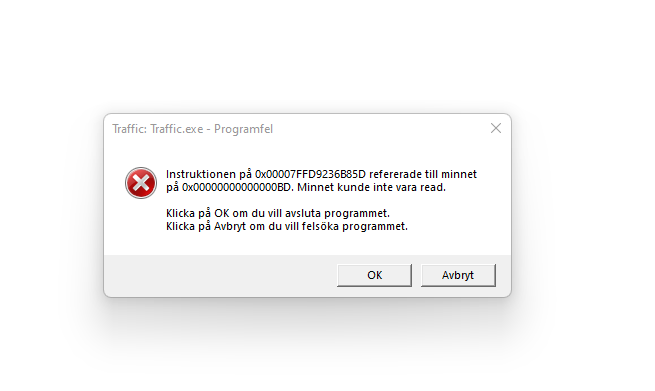


The issue was that the module QtLocation (a module that is enabling maps on Qt applications) hasn't yet been ported to Qt 6. The work is ongoing and can be tracked here.


This means that I need to postpone the migration to Qt 6 and use Qt 5.15 instead.

Using Qt 5.15 - a new crash

After installing Qt 5.15, I got a software crash when running the application. 

The program worked fine in Qt 5.12 so I assume there are changes in Qt between 5.12 and 5.15 that made my code fail.

My classes trainListModel, stationListModel and trackListModel are Model/View implementations for the network and are used to simplify the data presentation. They all inherit the trafficDataModel, which in turn inherits the QAbstractTableModel, which inherits QAbstractItemModel, which inherits QObject.


There is a flaw when I call the insertRows() function, where the position where I want to add rows is calculated as a number that I just incremented. When changing the position to the actual list of the train/track/stationListModel, the program works fine. 

The next step will be to review the code and push it to GitHub. After that, I'll investigate what to implement next.

Saturday, 18 June 2022

Hiding Information in Repos

When adding my codebase to Github, I want to avoid telling the world about my login credentials. To do this, I'll save the information in separate files that will be imported during runtime. I won't push those files to my Github repos and my credentials will remain secret.

I'll focus on Python and Bash in this blog post.

Bash scripts:

Create a file, for example "secrets.cfg" with the content:

password=testa123
In the bash script, source the file. Now, the parameters will be available as $password:
$ source settings.cfg

$ echo $password

testa123

Python scripts:

I'll use dotenv to set environment variables from a .env file that is ignored by Git.

I'll create a file ".env" with the content

DOMAIN=fatsug.example.org

The python script will use dotenv, so you need to install it using pip.

pip install python-dotenv

I'll make the python script look for a .env file in the users home folder. This is how the python script looks like:

import os
from os.path import expanduser
from dotenv import load_dotenv

load_dotenv(expanduser("~")+'\.env')
print(os.getenv('DOMAIN'))
For convenience, I can merge the secrets.cfg and .env files to one. Thus, I'll have all my user credentials at one location.