Showing posts with label JSON. Show all posts

Saturday, 19 January 2019

TravelTimeCalculator: Tying it All Together

TravelTimeHandler is now working in the sense that it collects directions from Google Directions (or casched from the internal SQLite database) and select the quickest option.

Implementation
I started with skeleton code that indicated what it was supposed to do using printouts to the logs.


The stubbed method. I'll replace the
console print statements with actual
code later.
After having the overall structure in place, I implemented the needed methods:

  • scanDirectionsForTap is activated when the user taps the map. It starts with a query to the database for any directions between the center of the map and the tapped location. If no results are found, it queries Google Directions for bicycling, driving, transit and walking.
  • getShortestDirectionFromDb queries the database for the shortest duration (or distance) between two points. It returns the value and an integer representing the mode.
  • saveDirectionsToDb saves the directions to the database
  • clearMarkers will clear the markers from the map (stub). I'll call this method when the map is moved.
  • addMarkers will add a marker to the map (stub)
  • getDirectionsFromUrl queries Google Directions for distance and duration for a couple of coordinates and a mode of transport. The response is handled in the over-ridden method onResponse. onResponse adds the result to the database. After that, it will query the database for the shortest distance/duration using getShortestDirectionFromDb.
  • readDirectionsFromJson extracts the relevant data from the JSON response from Google Directions.

Since the database handles only integers for the coordinates, I'll multiply the coordinates by 1000 and round them to integers when querying the database. 

The output from some queries is:
Initially, the app had no direction data for the coordinates.
After the query, the database was populated with the data.

Context 
One issue that I saw was applicationContext. When having code that uses context in another file than the mainActivity.java file, the app can't find it. The solution was to get the app context explicitly:


Remaining Work
I want to visualize the results with markers. I'll add one marker in the middle that represents the current location.

When the user taps on the map, I'll add a corresponding marker on the map. The marker will have a color or symbol that indicates the quickest transport mode (driving, transit, walking or bicycling).

When the user moves the map, the existing markers are cleared. The app should look for existing directions in the database and add corresponding markers automatically.

Saturday, 12 January 2019

TravelTimeCalculator: Selecting Coordinates to Scan for Directions

I'll simplify the selection of destination coordinate to scan for. Instead of having the app selecting some coordinates around the center, I'll let the user select the coordinates by tapping on the map.

The work flow will be like:
  • User re-zooms and pans the map to a new origin:
  • Clear existing markers (clearMarkers)
  • The app searches for any existing directions starting or ending at the coordinates (getDirectionsFromDb)
    • If found, it adds corresponding markers (addMarkers).
  • If the user taps the map,
    • If coordinates are not found in database, (getDirectionsFromDb is null)
      • Send Google Directions requests, (getDirectionsFromUrl)
      • Save response to database (saveDirectionsToDb)
      • Add marker to map
    • If coordinates are found, add marker to map
Step 1: Add a OnMapClickListener
I followed the instructions regarding detecting a tap on map from the official documentation. As soon as the map was installed, it crashed. The crash was my mistake, since I added the code in "onCreate". After adding the code to "onMapReady", it worked.

Step 2: Create a new class, TravelTimeHandler that handles the requests and decides whether to send a Directions query or query the database. It shall also add data to the database.

I moved the methods getDirections and readDirections to that class.

Step 3: Define what methods new methods to use.

  • readDirectionsFromJson
  • getDirectionsFromUrl
  • getDirectionsFromDb
  • saveDirectionsToDb
  • clearMarkers
  • drawMarker

Step 4: Implement those methods.
I'll cover this step in the next blog post

Saturday, 10 November 2018

TravelTimeCalculator: Sending Directions Request and Analysing the response

First, I need to request the INTERNET service in Android:
android.permission.INTERNET

I'll use a HTTP library called Volley. and also RequestQueue.

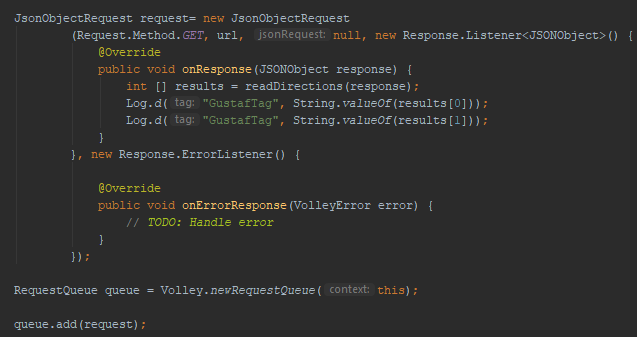
The request is based on JsonObjectRequest and when it gets the response, it will invoke a method that will interpret the response JSON object.


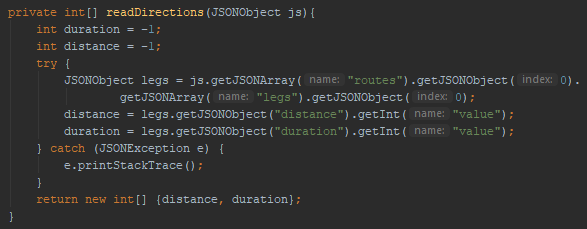
After the response is fetched, readDirections method will find the duration and distance in the JSON object.


The response from the method will be sent as an array of two integers.

Next step will be to design the database and to add and search for entries in the database.

Saturday, 27 October 2018

TravelTimeCalculator: Creating a Google Directions Request

After adding a button on the Google Maps view, I've added a listener to it that fetches the center coordinate for the view (cameraTarget).


If those coordinates are available, the app will build a string that will query the Google Directions API for biking between two coordinates:

https://maps.googleapis.com/maps/api/directions/json?origin=55.59,13.019&destination=55.6,13.019&mode=bicycling&key=<MY_API_KEY>

After typing the string into a web browser, I get:

In the next blog post, I'll send the request from the app and analyze the result string.