Showing posts with label QML. Show all posts

Sunday, 1 April 2018

TrafficControl: Displaying System Load

I aadded an indicator of the system load, defined as the time needed for simulating one second.

The time is measured in networkControl::stepTimeForNetwork as the time used between start and end of that function. The system load is calculated by dividing the computation time by the interval time.

For each tick, the results are shown in a textLabel on the user interface.

When running on my system (i5-8250, 8 GB RAM), three trains, the load is:

  • Debug version, PC in battery saving mode, average 5 ms, occasionally up to 15 ms.
  • Debug version, PC in performance mode, average 2 ms.
  • Release version, PC in battery saving mode, average 2 ms
  • Release version, PC in  performance mode, average 3 ms

This means that there is room for bigger networks in the program

Saturday, 20 January 2018

TrafficControl: Locking Tracks for Trains - Tests and Visualization - QML

The visualization of locks in QML will be dynamic, with a green/red dot at the start/end station if the track is locked:.

  • FREE: If the track is free, no dots will be shown. The track will be green. 
  • END/START: If the track is locked in both directions, red dots will be shown at both end and start station. The track will be red.
  • LOCKED: If the track is locked at start or end station side, a red dot will appear near that station and a green dot will appear at the eother station. The track will be yellow.
When the lock status is changed. a signal is sent to QML with the new state of the track.


If the state goes from FREE to any other state, two dots are created close to the start and end station. To avoid overlayed dots, the QML part will search the QML tree for existing dots and add new signal dots only if there are no existing dotsfor that particular track..

If the last train leaves a track, that track will be set to FREE and the corresponding signal dots will be removed in QML.

When removing QML items, it takes some time for those changes to take place. That caused some strange behaviour when a train arrived to a station, where another train is waiting for the same track:
Train 1 arrives to station 1 from track 1, existing dots are removed from track 1.
Train 2 enters track 1. QML looks for signal dots for track 1 and finds them as the removal is still in process. The signal dots are repainted.
The signal dots for the track 1 are finally removed.

Saturday, 23 December 2017

TrafficControl: Making User Interface Flexible with DockWidgets

Some readers may have seen that the user interface has a new look. Now, the user can select which widgets should be visible at run-time, how big they should be and where in the program they should be.

The user interface is designed in the file TrafficControl.ui, that is based on XML. That file contains the different widgets that makes up the user interface. 

When compiling, TrafficControl.ui generates a corresponding header file that  is called from the program (trafficControl.cpp/h):
The file ui_trafficControl.h is generated at runtime from the file trafficControl.ui
I've added qDockWidgets to the form that contains the elements. A qDockWidget is basically a container that can dock to different borders of the applications interface. The user interface assigns some space on the form, depending on the size of the contents, other widgets and the user's decisions.


A qDockWidget can be closed (set to invisible) and floating (presented in a separate window) if the user wants to. A list of the qDockWidgets is shown if the user right-clicks on the title for a qDockWidget.


This is needed as my program grows and there will be much more information to present to the user.

I've recently learnt how to use qDockWidgets and I'll explore more of its abilities in a future blog post. 

Future work: 
Add a panel of pushButtons, one for each qDockWidget that is available in the program. The buttons should have icons that describe the contents, for example Map, Train List, Basic Controls, Log window...

Friday, 11 August 2017

TrafficControl: Protecting the Code

After reaching the milestone in the second last blog post, I've done some refactoring of the code to make it cleaner and simpler to maintain:
  • Reviewing parameter names
  • Adding Doxygen comments
  • Replacing STL vectors with QLists
  • Calling the QML JavaScript functions directly
The next step will be to introduce automated tests. This is crucial to protect trafficControl from new and existing bugs.

Initially, I'll learn how to use the test framework in Qt Test. After that, I'll focus on some areas:
  • How to reset the traffic network between different tests
  • Module testing - to verify the modules/functions
  • Input files - how to detect problems in the network definition files
  • Useability/User Interfaces
  • Test-Driven Development - Mainly for different traffic scenarios
  • Performance Testing/Optimization 
  • Memory leak tests

Sunday, 6 August 2017

TrafficControl: Possible Areas for Optimization

When designing software, it is often important to compromise between simplicity and performance. Optimizing source code can improve performance, but it will also make the software more complex and harder to debug and maintain in the future.

For TrafficControl, I've identified some areas where I can optimize it, if that will be needed later on:
  • Accessing QML items from C++: In the QML slot, the JavaScript is iterating over the QML object tree until it finds the item with the corresponding objectName. It should be possible to save the index for the particular QML item when creating it, and save the index so that C++ objects can access the QML item directly. 
  • Updating position of trains on tracks: Currently, the program is iterating through all coordinates to find wich two consecutive coordinates to interpolate between for every update. It should be possible to rmake the program remember the last coordinate and search from there.
  • Implementing model/view for the QML map: Explore whether this will improve the performance.
Before doing all that, I'll review, refactor and clean up the code.

Tuesday, 1 August 2017

TrafficControl: Mapping Position on Track to Coordinates

TrafficControl is supposed to present the train positions on the tracks in real-time. To achieve this, the trains needs to get their locations, when providing their location on the tracks.

I'll implement a function in tcTrack that will work in three steps:
  1. In the track constructor, the coordinates are already provided. A Haversine formula will calculate the accumulated distances between the first waypoint of the track and all following waypoints.
    1. Import coordinates to constructor - DONE
    2. Implement Haversine function - DONE
    3. Use Haversine function to generate list of accumulated distances - DONE
  2. A function will take an integer as input parameter (position on track in meters). The function will return the last waypoint that is before the input position. - DONE
  3. Another function that interpolates to provide the accurate coordinate.


The result can be seen in the video below. The color of the tracks are: Green (empty), Yellow (occupied). The color of the border of the station circles are: Green (empty), Yellow (populated) and Red (full).


After upgrading Qt from 5.7 to 5.9.1, that came two weeks ago, the map issue with tiles is resolved.
The road map forQt 5.9 canbe found on the web site.

Saturday, 22 July 2017

TrafficControl: Adding Trains to the QML Map - Coding

The trains are added in the C++ and QML part when the "ADD TRAIN" command is used. Initially, the trains are placed on a default location on the map,


When the station is specified (TRAIN SET CURRENT STATION), the train will be visible and get proper coordinates, according to the station name. In order to do this, the tcStation and tcTrack need to have their own coordinates in the C++ part. Until now, C++ has only passed the parameters to QML.
The train positions will be updated using qmlTrainPositionSlot.

From now on, the C++ station object will be aware of its own coordinates.

The train will be relocated using signal/slot mechanism, with position, delay status and number of passengers. For the current commit, the signal qmlTrainPositionSignal is only emitted when the train arrives to a station.
The red dots are the trains (currently only updated when arriving to stations)


The train from Ada_Lovelace from Gunnesbo has arrived to Lund
In the next blog post, I'll implement a function that will help the trains to calculate their coordinates based on the position of the tracks.

A side note: When compiling, the error message "Cannot convert QVariant to QVariant" might pop up. Include QVariant to the header file to resolve that issue.

Monday, 17 July 2017

TrafficControl: Adding Trains to the QML Map - Background

The trains will be visualized as a rectangle QML type or possibly a QML polyline with two coordinates.

The color should reflect the type of train that is used. Initially, I'll use the color used in the most common trains in Skåne:

  • PÃ¥gatÃ¥gen are using X61 trains that are 74.3 m long and 3.26 m wide, with a top speed of 160 km/h and the engines have a power of 2000 kW. It has a seat capacity of 234 passengers and a weight of 155 tonnes.

https://commons.wikimedia.org/wiki/File:X61.jpg CC by SA 3.0
  • ÖresundstÃ¥g are using X31 trains that are 78,9 m long and 2.97 m wide, with a top speed of 180 km/h and the engines has a power of 2300 kW. The seat capacity is 229 and the weight is 156 metric tonnes. The color will be gray.


https://commons.wikimedia.org/wiki/File:X31-Boras.JPG CC by SA 3.0  

It is possible to import a QtQuickItem to a map:

A MapCircle will be used for visualising the train. The initial proposal for visualising the train will be:
  • border.width : ceiling(Number of passengers / 100)  
  • border.color : Delay status (Green/Yellow/Red)
  • center : Location of the train
  • color : Color of the train
  • opacity : 1
  • radius : Indicator of train length. Radius = length / 2


It should be possible to animate that item. Check https://doc.qt.io/qt-5/qtlocation-planespotter-example.html


Wednesday, 12 July 2017

TrafficControl: Adding Tracks to QML Map (part 3)

I found how to add coordinates to a QML Map Polyline, so now the tracks are much smoother.


The method AddCoordinate needs a coordinate that is created using QtPositioning.coordinate(...). Using that, it is easy to loop over the coordinates in the coordinatelist and generate the curved tracks, as can be seen below.

I also implemented a better way of separating the double tracks, shifting the second track 90 degrees from the principal direction of the track. That is done in the KMLParser script (Python).

For now, I'm happy with the visualisation of the tracks. The next step will be to implement the trains.

Friday, 7 July 2017

TrafficControl: Adding Tracks to QML Map (part 2)

In order to make the map more useful, I had to separate the duplicate tracks on the map. I did this by adding an offset to the coordinates in the polyline.

A queue was also added for each track, in order to track how many trains are on the track. The queue will also help detecting whether the tracks will really follow a First In-First Out order.

The visualization rules will be defined in the QML JavaScripts. C++ will send the new states of the stations and trains.


The next steps will be to fix the tracks in QML and to add the trains to the QML map and update them.

Monday, 3 July 2017

TrafficControl: Adding Tracks to QML Map

The next step is to add tracks to the QML map as a MapPolyLine.

As before, a KML file in Google Earth is parsed to an input file:

When scanning the input file, a typical track will look like this:

The function TrafficControl::importPredefinedNetwork() will catch the track info and call TrafficControl::addTrackToNetwork(name, length, coordinates):

After the trafficControl item is added, the QML method for creating tracks is called.

The JS function in the QML file calls a function in the separate JS source file (TODO: try to avoid this step.


The jsCreateQMLTrack creates a polyLine with two coordinates only. I am trying to make it create a polyLinr with an arbitary number of coordinates.


The final result is a map with lines between the stations.

The next step will be to make the colour and width of the tracks reflect the state of the track.
  • Width will reflect number of trains on the segment. Width will be number of trains + 1.
  • Color will reflect the state of the track:
    • Green means available with no trains on the track
    • Yellow means that there are trains on the track, but more trains may enter
    • Red means that no trains may enter (Busy or Emergency stop)
    • Grey means signal error. Only trains movements in primary direction, and with reduced speed.

Thursday, 29 June 2017

TrafficControl: QML Station Visualisation of Available Platforms

The first step for visualisation of stations will be an indicator of available platform.

The border for the station QML elements will have different colors, depending on the state:

  • Green indicates that all platforms are available,
  • Yellow indicates that at least one platform is occupied and at least one platform is available,
  • Red inidcates that all platforms are occupied


A test run of TrafficControl is shown in the video below. Three trains are dispatched on the map at Hjärup, Gunnesbo and Lund. Their locations are shown in the tables to the left.

More visibility on the map will be added during the summer.

Saturday, 24 June 2017

TrafficControl: Graphical Representation of a Station

Now when I know that I can mofidy the look of a station QML item from trafficControl/tcStation, I need to decide what info to visualize and how.

Some of the information I want to visualise for the stations are:
  • Number of waiting passengers
  • Number of people in the surrounding area
  • A metric for the delay
  • Status of occupied platforms on station: All platforms available/Some of the platforms are available/No Platforms available
The station is represented by a MapCircle QML type, which has the following members:
  • border.color
  • border.width
  • center - given by the station's coordinates
  • color 
  • radius
  • opacity - it should be possible to see through the item.

In this example, the border color is black and the width is is 30 pixels. 

The MapCircle can also be hidden by setting the property visible=false.

For future studies:
  • If neccessary, one can also add internal QML items inside the mapItem.
  • Maybe I can have some more detailed information to show on the station, either by
    • clicking/toggling the QML item, or 
    • presenting information related to the QML item that is currently highlited.

Tuesday, 20 June 2017

TrafficControl: QML MapCircle Element Exploratory Testing and Design proposals

In this blog post, I'll explore how the QML Map Circle behaves to understand what I can do with it.

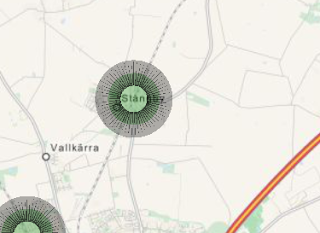
First step is to define a green circle with radius 500 m, opacity 0.3, and a black border of 30 pixels:
The border  is centered on the edge of the circle, consists of several overlapping rectangles.
When zooming out, the border is bigger compared to the green circle, since it is defined in terms of pixels.


Conclusion: The border shouldn't be too big, since that will block the inner circle. The border opacity is similar as the circle.

  • The opacity should be at least 0.3 and at most 0.7.
  • The border width can be from 0 to 4 pixels.
  • As stations will typically have distances of at least 2000 meters, so a maximum radius of 1000 should be sufficient.
  • White circles with black borders should be avoided since that might be confused with towns.

For now, I'll use the following coding:

  • border.width: 3 (always)
  • border.color: Green (all platforms available), yellow (at least one platform taken and at least one platform available), red (all platforms are taken). For now, I'll use only Green and Red since the number of platforms are currently not available. 
  • radius: number of waiting passengers [100-1000 m, default: 100 m]. Mapping of waiting passengers to radius will come later (to be implemented later).
  • color: A metric of the delays (to be implemented later).
  • opacity: 0.4 (not defined what to visualize)
This means that I'll also need to implement a list of  trains currently located at each station. When a train arrives or departs, the border.color may change.

Friday, 16 June 2017

TrafficControl: Modifying Existing Station QML Items from C++ (continued)

In the previous blog post, I was able to send a signal from C++ to the QML part of the program. This is necessary to be able to update the QML map when the trains, stations and tracks change.

There are two ways to update the QML parts:
  • Either change the QML object properties directly from C++ (this is generally recommended). However, this approach requires the C++ part to know about the internal structure of the QML part, which will make future updates of QML structure very risky. http://doc.qt.io/qt-5/qtqml-cppintegration-interactqmlfromcpp.html 
  • Use signal-slot to invoke a QML Javascript where the QML object properties are changed. I'll follow this approach for now.
I have a signal/slot relation between C++ and QML part

When the train arrives to the station, tcStation:trainArrival will emit that signal to the QML part:

The slot part in QML will iterate through the QML objects until it finds the corresponding station. 
I followed the example on https://stackoverflow.com/questions/13187439/qml-element-id-access-from-c
When it finds those stations, it will modify them, in this case changing the color to red and the radius to 1000 m.


Now, I need to think through the graphical design of the map elements (tracks, trains and stations), so that they will reflect the relevant information. I'll cover that in future blog posts.

Some notes:
To be able to send data to a QML/JS slot, the parameters must be of the type QVariant (a QVariant acts like a union of the most common Qt data types).

There will be a need for future optimizations in this approach. I may need to save the address/index to the QML items in the C part so that I won't need to iterate through all QML items every time I'm updating any QML item.

I later renamed the slot to qmlStationOccupancySlot

Sunday, 11 June 2017

TrafficControl: Modifying Existing Station QML Items from C++

The blog posts has been scarse, due to positive news in my closest family. I'll be a busy family man for the coming decades but I'll keep writing on this blog.

When something happens to a station in the C++ part of the program, the corresponding QML item shall be modified. I got inspiration from a post on Andrew Jones' blog, regarding QML/C++ interactions using signals/slots.

Train::move() will trigger signal that will be caught by the QML part and update the map.
  • A train enters a station
  • A signal is trigged by train::move(), containing the station name, the train name and a description of the event
  • A slot in the QML part recieves the signal and extracts the information.
  • The corresponding QML item is updated
The new signal is called stationChangedSignal, and will contain three qVariants:
  1. The first will always contain the name of the station that is changing
  2. The second parameter will define what has happened (in this case: "train arrival")
  3. The third parameter will define any other items/objects (in this case, the train name)
In this case, I'll let the train::runningToOpeningState() emit a signal:
stationChangedSignal("LundC", "train arrival",  "Hedy_Lamarr")

This signal will tell the QML part that a train named "Hedy_Lamarr" has arrived to the station LundC".

The current commit, 1c198ff, has introduced a signal without any parameters. I still have some problems parsing a signal containing qVariant data to the QML javascript. More about that in the next blog post.

Thursday, 25 May 2017

TrafficControl: Recap of the QML Station Handling

The python script TrackStationConnector reads a KML file containing a station.

A KML file contains station information as a placemark.


The script TrackStationConnector extracts track information and converts it to a proper input format.


TrafficControl has a function that is analysing the input file, and if it finds a station with coordinates, it will call a function that creates the QML station

The QML item iscreated by calling a JavaScript in the QML part

This code is probably redundant, I will try to remove it later.

Finally, the JavaScript in a separate file creates the QML item.


Wednesday, 17 May 2017

TrafficControl: Refactoring the Train::move() Function (3)

The refactoring task is done now, according to the state model I described before.

Most of the refactoring was done in the tcTrain method. I found some redundant code, that I've been able to remove.

I also found a bug: The variable nextTrack, that records the ID of the next track the train should select was never reset. Later, when the train arrived at a station, the value of that parameter made the program need to search for suitable tracks twice, instead of once. The end result was the same, so the bug wasn't visible.

The next step in the implementation will be to add tracks to the QML map.

Wednesday, 10 May 2017

QML: Sandbox

In order to learn QML and interactions between QML and C/Qt, I created a simple sandbox that I've published on my GitHub account.

Anyone is free to download and play around with the software (under GPL conditions). However, I strongly recommend you to learn QML step-by-step and build a QML application from scratch.

The QML is created from C++:

The QML file has some static items that are defined from the beginning. Those items has some attributes that defines their appearance. Also, new items can be created dynamically.

  • A blue rectangle in the top left corner. Inside that rectangle, there is a text. When clicking in the rectangle, two things will happen:
    • Another QML item will change color from green to blue. 
    • A text will appear to the left, rotate 360 degrees and fade away. That text is created from a JavaScript that creates the item in the file sprite.qml
    • A blue rectangle in the top left corner. Inside that rectangle, there is a text. When clicking in the 
  • A blue text field below the blue rectangle, that turns green when the rectangle above is clicked
  • A blue text field that turns golden when a function in C++ is launched.
  • One of the rotating text fields to the right is re-coloured to red from C++ 
  • The faded blue square is created from a string.

The process of creating this program has taught me how to create QML objects and how to interact with C++ in a sandbox.

Thursday, 23 March 2017

TrafficControl: Four Commits and a Bug

I pushed the code with the dynamic QML stations, code cleanup and fixes to the KML parser to the CuteTrains GitHub repo  in four commits (one of them since I'm still on the Git learning curve and two of them are simply bad planning from my side). 

The fixes to the KML parser (trackStationConnector.py) considers the direction of the track in the file name. 

The code cleanup is an attempt to follow the C coding style according to https://www.gnu.org/prep/standards/html_node/Writing-C.html

When running three trains on the bigger network file (Skane_Coordinates.txt), I notice that the trains doesn't follow the travel plans. I know that the train::move part of the program is a mess and needs refactoring. 

I'll focus on debugging the issue with the trains inability to follow the travel plan in future blog posts.