Saturday, 10 August 2019

Garage Cleanup

My summer project at the summer cottage was to fix the garage. You can see the before images below.


 The black marks in the wall are probably from car decks. There is also a couple of holes in the wall.

 After throwing away some rubbish and emptying the garage, I was able to paint the surfaces. I got help with painting the kitchen shelves (they are from a French kitchen of the late 1970's).

I've mounted four connected IKEA Hejne shelves on the far wall. To avoid stains from the firewood, I had a tarp behind the wood.


 And two connected 50 cm IKEA Hejne shelves in the corner.

This took some time from my ordinary pet projects. I'll resume them now.

Saturday, 27 July 2019

StockAnalyzer: Lessons Learned from Web Scraping

After spending too many hours fixing flawed data, I've learnt some lessons:

Use English when describing the data
Using another language is a very common mistake for non-English natives, especially if one believes that the data will have a very limited audience. Applications has a tendency to grow and involve more people.

Use standardized formats for input data
I've seen some strange data files for other applications, and it is a nightmare to decode them. Unless there are strong reasons to save storage space, I recommend using plain text files such as:

  • csv - Compact for data. However, missing separators will shift all data to the left. This can be difficult to recover
  • json - Quite compact for data, but slightly harder to implement. This way, it is clear what the different values represent.
  • xml - This will generate some overhead and may be difficult to implement, unless there is some handy xml class that can handle the xml coding.
  • Database - Feeding the scraped data directly into a database. This is a bit complex but has some advantages: It will indicate if there are errors, the data labeling is clear and it will be compact. One disadvantage is that it takes some time to set up the database.

Handle bad or missing data directly
If there are flaws in the web scraper, or the web server, the data will be flawed. This will be a big problem if the web scraping continues - big chunks of data may be missing or erroneous.

Test the data and the format
This will help finding flawed data early. Tests may check the number of data points, the type of data (integer/float/names) and how the data is changing over time.

Cross-verify numbers
It can be useful to scrape some extra data for cross-checks. For example, scraping Price, Earnings and Price/Earnings will make it easy to check that those values are valid.

Handle changes in the data
This is quite obvious. The web services that you want to scrape will change its interface once in a while and that will break your web scraper. As mentioned above, you need to see that immediately, otherwise you'll have tonnes of data that needs to be fixed.

Automate the web scraping
After all, the purpose of computers is to liberate people from manual labor. This applies to web scraping too. If it isn't started automatically, it is easy to forget it.

It is easy to set up the web scraping script using cron (Linux) or the Task Scheduler. I strongly recommend that you check that the tasks are really started as they should, at least the Task Scheduler isn't totally reliable.

Make the data database-friendly
It is very likely that you will send the data to a database sooner or later. Considering how to do that early will save you a lot of effort.

Side note:
One very common issue is missing yield values. That can span over several months of data. I've created a python script to resolve that issue by adding an empty piece of data for the missing piece of information.

Saturday, 20 July 2019

StockAnalyzer: Fixing Flawed Data (continued)

My work on the program StockAnalyser is currently in a iterative cycle:
  • The program adds records to the database until it crashes because of some flaw in the input data
  • Fix that issue 
  • Repeat
This means that most of the blog posts for now focus on handling new cases of flawed input data. Please bare with me.

Each record is a line of comma separated values. For some records, one value is missing. By looking at the remaining data, I'm able to see what data is missing and replace that manually.

By adding a semicolon before the profit margin (in this case), the program will be able to populate the missing data with a null value.
Fixing hundreds, or thousands of records isn't possible to do by hand, and I'll need to create a script that can re-populate the missing data. I'll develop that script in the next blog post.

Saturday, 13 July 2019

StockAnalyser: Recovering Missing Data

In this blog post, I'll add code that protects the program when parsing strings to float values and I'll also add code that tries to recover missing information.

First, I'll add try-catch clauses to handle parsing errors from string to floats.

After that, I'll add functions to verify and populate null entries of the key numbers.

For the triplet of P, P/E and E. there are eight possible scenarios:
P = null, P/E = null and E = null - Impossible to recover
P = null, P/E = null and E != null -Impossible to recover
P = null, P/E != null and E = null - Impossible to recover
P = null, P/E != null and E != null - Recover P

P != null, P/E = null and E = null - Impossible to recover
P != null, P/E = null and E = !null - Recover P/E
P != null, P/E != null and E = null - Recover E
P != null, P/E != null and E != null - No need to recover

I'll start to count how many null values I have. If there are two or more null values, I can't recover any data. If there is no null value at all, I don't need to recover any data.

I will add two boolean flags later.
One will indicate if any data in the stock record has been recovered and
 another flag will indicate if the data is so bad that it shouldn't be sent into the database.
The screen shot below illustrates how the earning value is recovered (example from 2018-06-13, AAK, a Swedish company that is producing vegetable oil and fat.)


Similar functions are added for the Price, Price per Capital (P/JEK) and the Capital per share.

Now, only profit margin is missing. Since that is calculated as the profit (P) divided by the total revenue (not recorded), I can't recover that value. I'll simply parse "Null" to the database, if that is missing.


After fixing this, I was able to scan stocks until 2019-02-15. For that date, most of the information is missing.

The fix here is to add a flag that indicates whether the stock record contains sufficient information to be added to the database. 

Side note: The board of AAK decided to perform a 6:1 share split, where one old share generated six new shares. This explains why some data was missing for that date. The next project will detect and handle share splits.


Saturday, 6 July 2019

StockAnalyzer: Validating the Raw Data - Broken input data and Missing Report date

My Stock project is progressing and I'm currently adding fixes for flaws in the input data that I want to add to a SQL database. In my previous blog post, I added a fix for records that has no information about the stock price.

In this blog post, I address some more issues:
Input Data Replaced by HTML Tag
The program tries to parse ass="BrodTextWhite" width="12">? to a float number. I don't know why this string has replaced the data.

I will handle this by simply removing the bad record. I haven't seen that for other stocks and there is no information in the string that can recover the missing data.

Invalid Data for Dividend or Report Dates
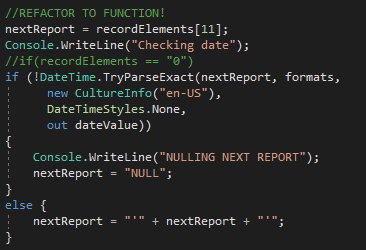
Another issue that I saw was that some records had an invalid date for the report. I solved that by checking that the string can be parsed to a date. If not, I'll feed the NULL value to the database.

Now, the database has a NULL value when the date is missing.


Empty Profit Margin
Now, I was able to scan three stock records for almost five years (2013-07-28 to 2018-06-13). For AAK, the program is trying to parse an empty string to a value.

There are some empty values: Earnings per share, Capital per share, Dividend per share and Profit Margin. I can recover everything except for the Profit Margin, that requires information about sales in relation to the production costs. Since this information is important, I will add the stock information but set the profit margin to NULL.

Populating Missing Data?
I will create functions for filling in some data that is missing, if corresponding data can help calculating that data.

For the AAK record of 2018-06-13, the Earnings per share is missing.

I will handle this in two steps (next blog post):
First, I'll add try-catch clauses to handle parsing errors from string to floats.
After that, I'll add functions to verify and populate null entries of the key numbers.

Saturday, 29 June 2019

StockAnalyzer: Validating the Raw Data - Missing Price

In my last blog post, I was able to add data from July 2013 and later. Before that, the data has a different format and I will handle that soon.

I have seen that I will need to check the data before adding it to the database. Sometimes, data is missing and sometimes, the data comes in a different shape.

I will discuss the issues when I see them.

Missing Price Information:
The web site that I use displays the price (the price of the last transaction) if there has been any transactions that day. If no transactions has happened that day, the price field is empty.

If that number is missing, the parameter "P" will have the value null. However, it is always possible to calculate the price by multiplying P/E by earnings per share (E). I'll illustrate with a real-world example:

On October 9th, 2014, the trade in the Swedish company Eniro was halted by the stock exchange in Stockholm and the Swedish Financial inspection. For that day, all trade was halted for Eniro and there was no price quote for that day.

The stock price number is corresponding to Senast (Latest). Screen dump from June 2019. 
The screen shot above shows the web pages that I'm scraping. Most of the times, the fields are populated with data, but there are some exceptions. In the case of Eniro, the dividend (utdelning) and yield (direktavkastning) are omitted since there is no yield for that company. The webscraper interprets those fields to be zero.

Price is available for Eniro (10,19 SEK per share). The price corresponds to the the P/E (1,84) and Earnings per share (5,52) since 1,84 times 5.52 equals 10,16 SEK.  
On October 9th, 2014, price info was omitted. It is still possible to estimate the price using:

  • Price/Earnings rating, the Earnings per share and also 
  • Capital per share and the Price per capital:

On October 9th, 2014, no trades were done for Eniro.
As a consequence of that, there is no record of stock price for that date.
Multiplying P/E by E gives 6,77 SEK. 

 I expect this to happen very seldom, but I will add a row to the database that indicates when the price information is missing. The neural network will tell whether a missing price information will predict anything in the future.

Coding:
After fetching the stock record, all data are represented O as a string list. In this case, the string for price is empty, and string2Float thus returns null.


I added a function inside the method for scanning the stock record. That function is in the same scope as the other variables and can modify them.
 If P is null, P is recovered using P/E and E and a boolean parameter is set to indicate that the parameter was missing from the raw data.
 I have updated the database to include a bit telling whether the price information was missing in the stock record.
Now, the price is added along with an indicator of missing price. "1" indicates that the price is missing.

Saturday, 22 June 2019

StockAnalyzer: Scanning the Stock Files for Data

Now, I will start to interpret the data in the input files (YYYYDDMM.csv) and generate SQL commands based on that information.

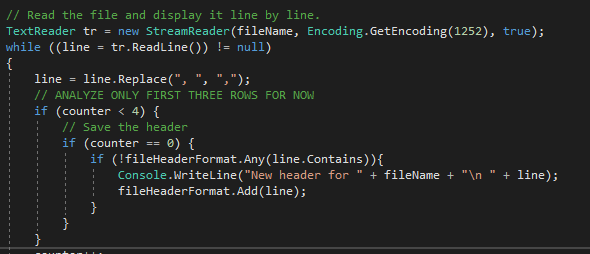
I will start by analyzing the headers of all the data files.

I collect all unique headers to a stringlist and print the contents to the console.

There is plenty of data but I will only use some of it. The data that is common for all three different kinds of versions are:
  • Name,
  • Price (P),
  • Earning per share (E),
  • P/E - This is redundant and can be calculated from P and E. I'll use this to verify  P, E and P/E values
  • Annual Dividend (D)
  • Stock Yield (D/P) - This is redundant and can be used to verify P, D and D/P
  • Capital per Share (C)
  • Price/Capital (P/C) - This is redundant and can be used to verify P, C and P/C
  • RSI - Indicator of volatility
  • TA - Technical Analysis. This information was available for the first years.
  • Date for Dividend - Only available for later stocks
  • Date for report - Only available for later stocks

I will start by scanning one file and extract the values.
The first line is the header. If that header string hasn't been detected before, the program will add that header to a list of headers.

The other lines contains the stock data and I'll parse them to parseRecordToDatabase that extracts the relevant data and creates a SQL query that adds the record to the database.
 I will use a switch case to identify the different headers.
 I will split the each line of the file into the different data points and do some initial integrity checks of the data.
After the checks, I will create a SQL query string to enter the data to the database. I'll parse that string to my database handler.

Next steps:
  • Add counters for the number of records that I was able to decode and add to the database
  • Add two case clauses for the other two types of input data
  • Add checks for the input data for errors
  • Analyze a file only if the corresponding date doesn't exist in the database.
  • Refactor and clean up code