Saturday, 15 June 2019

StockAnalyzer: Selecting the Input Files

Now, it is time to interpret the input files. They are named in the form "YYYYMMDD.csv" and contain a header row that describes the contents.

I need to consider some possible issues for the input data:
  • The file headers has slightly different formats since I have added some information in the later versions. 
  • The early versions of StockReader had hard coded references to the stocks. Thus, some stock records has sometimes slightly different names of the stocks. Sometimes, the companies changed names too. I need to add checks for the stock names, and possibly add a second table that maps different names to the same stocks.
  • Sometimes, the data acquisition was interrupted.

I'll start by selecting which files to analyze, based on the file names and the time interval that the user has specified in the dateTimePickers.

In order to do that, I use a built in function for removing the file path and the file extension. The remaining string contains the year, month and date:
Now, I process only one file.
Now, I want to check whether the corresponding date is within the time interval. For that purpose, I need to convert the string 20101110 to a datetime format. This is done in three steps:
Step 1: Check the file format - I'm only interested in comma separate value files.
Step 2: Check the date - I'm only interested in files that are corresponding to plausible dates.
Step 3: Convert the date to dateTime format and check whether the date is between the start and end date that the user has specified.
If all these checks are OK, the program will analyze the file. I'll do that in the next blog post.

Special Characters - ÅÄÖ
Since I am collecting data from Swedish stocks, I will handle strings with Swedish characters. I solved that by adding a streamReader object that is configured for the Windows 1252 encoding that contains Swedish characters.

As a side note, I added an UNIQUE constraint to the database. There can be only one record for one company at a particular date.

Saturday, 8 June 2019

StockAnalyzer: Adding Code

Now, it is time to add some code to the program.

Database
The database is controlled from dbParser.
I added some code for printing the contents of the database to the console and also code for clearing all data from the database.
Code for printing contents of database to console.
Code for deleting all records of the database.
The first step is to delete all records from the StockTable.
The second step is to set the identity counter to zero.
Scanning for Files
I have saved my input data in a local folder on my computer. Thus, it is convenient for me to have that folder as the default folder. However, I want to avoid assuming that that folder exists - someone might fork my repo and install it on another system.

To handle this, the program will check whether my folder exists. If it doesn't, it will use the user's document folder instead.
I'll clean up this form soon.
When the user presses the "Scan to Database" button, the program will scan for the files in the class scanFolder. First, I need a list of all files in the current folder. Once I have that file list, I will iterate over it and scan only the files that are in the time interval.
In the next blog post, I'll make the program select which files to analyze and also start to add records to the database.

Saturday, 1 June 2019

StockAnalyzer: Creating a Structure of the Program

I've been able to populate my database with some dummy data and to read it from the database. That's an important step and now, I need to define the overall structure of the program.

Use Cases identifies some scenarios where an user is using the system:

  • User wants to delete all stock records from the database
  • User wants to scan all available files and add the data to the database
  • User wants to scan all files within a specified time range
  • User wants to update the database with the latest results from StockReader

The program will have three different modules:

  • User Interface - Collects the parameters and call methods/functions
  • FileScanner - Select which csv files to scan and determine whether the data in a row contains enough information so that it can be added to the database.
  • DBParser - Build SQL queries and launch them. Database error handling.
Now, I have a rough idea what the program should look like. I have added a couple of user interface widgets to my app. The code is stubbed right now:

I will clean up this form later.
In the "Time Interval to Scan" group box, the user will be able to limit the number of files that shall be loaded into the database.

In the "Directory to Scan" group box, the user will be able to select where the input files are. The text of the button shows the current folder.

The user will be able to clear the database and scan all files that matches the dates in the folder. The algorithm will look like this:

  • List all csv files in the current folder. 
  • For all files that are matching the time interval:
    • Check the headers in order to know how to interpret the data.
    • For all rows in the file: 
      • If the needed data is there for that stock, add the information to the database


I have also created two classes: FileScanner and DBParser. Those are instantiated when the program starts.

In the next blog post, I'll fill the classes and widgets with code.

Saturday, 25 May 2019

StockAnalyzer: Connecting to the Database and Designing It

As I have mentioned before, I will process the data in three steps:
  • A C#-app for Windows that will populate the database (ongoing)
  • A web app that will analyse the database and look for inconsistencies
  • A Python script (or possibly Matlab script) that will perform machine learning on the data set.
In the last blog post, I created the database that I will work with. Now. I'll start populating it.

The first step is to connect to the database. I'll use an example that I found:

The language setting is Swedish.
For non-Swedish speakers, the error message
says that the key attachdbfilename is invalid.
The key attachdbfilename is invalid. The DataDirectory needs to be changed to an actual library. I'll start by fixing the connectionString and using a standard SQL query:

I can now connect to the database and launch a simple query!

The First INSERT and SELECT to the Database
I extended the query to the database. First, I populated the database with some dummy data. After that, I selected all rows in the database and presented them as a message box:
It shouldn't be possible to add more than one record of a particular stock for a particular date. I will add a UNIQUE constraint. I will fix that soon.

Next, I need to plan how to design the application, with different classes and layouts for the user interface.

Side Note:
I added  the project to my GitHub account, using instructions on GitHub.


The updated code is available at https://github.com/cutetrains/StockToDatabase

Saturday, 18 May 2019

Telecom: Some 5G Resources

A friend of mine asked me for some 5G resources. Here are a couple of them.

Obviously, I need to mention my employers resources on 5G.

Rohde & Schwarz is a Munich-based company that offers excellent expertise in the area:

They will release a 5G NR ebook soon, you can pre-order on their web site.

Niviuk is a web site that I use as a quick reference and for visualizing radio frames.

Edit: Sharetechnote has an excellent 5G section.

Saturday, 11 May 2019

StockAnalyzer: Building the First C# Windows App and a Database

It's been a while since I used Visual Studio, so I had to install a lot of updated.
Updating the environment takes time but is crucial for development.
I have spent too much time debugging issues that were solved with an update.
Since my version of Qt is dependent on Visual Studio, I had to rebuild TrafficControl and verify that it still works. Fortunately, it worked like a charm.

To learn about Visual Studio, I opened a simple example app that simply contains a text field. a button and a hyperlink:
The code is very intuitive: The main thread shows the form and the Form1 designer sets up the user interface element. In Form1.cs. there are some listeners to events such as a mouse click or a click to a hyperlink.

Adding a Database and a Data Source
First, I need to create a database. It is possible to use the Azure platform to do that online, but I'll create a local Microsoft SQL database instead. I followed the steps from the documentation.


Step 1: Select a local Database

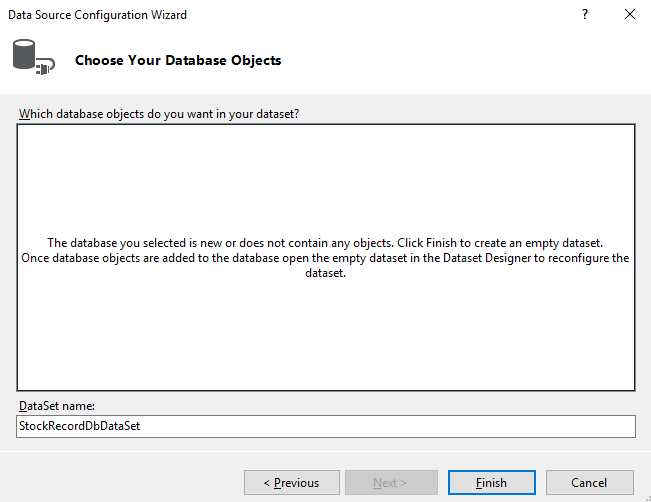
Step 2: The database model shall be a dataset.

Step 3: Name the database object to StockRecord
Now, there is an empty database that I can use in my project.

The next step is to design the database itself and connect to it.

In the next blog post, I'll connect to the database from the program and populate it with some dummy data.

Saturday, 4 May 2019

StockAnalyzer: My Data and Some Stock Theory

As I've stressed several times before, this blog describes my learning curve in programming. If you find errors or areas where I have misunderstood the concepts that I explore, you are welcome to comment or contact me.

My Understanding on Stocks
In theory, it is very easy to tell the value of a stock. Sum upp all future dividends that the stock will generate and compensate for future inflation et voilà! - you have the value of that stock. The problem is obviously that no one has that information. Instead, pricing and valuation of stocks is a subject of debate and drives all stock trade.

When a stock trade takes place. two actors has different ideas of the value of that stock: The seller thinks that the stock is so high that he/she prefers money instead of that stock. The buyer thinks that the same price of the same stock is so low that he/she prefers the stock instead of money.

The Efficient Market Hypothesis is central in this subject. Put simply, it assumes that all relevant  information about the stock is already reflected in the stock price. Based on that theory, it would be impossible to systematically outperform the stock market.

The Weak Efficient Market Hypothesis indicates that the stock/asset prices will be adjusted to the available information in the long run. However, there may be short-term biases that can be used to outperform the market, according to the theory.

Technical Analysis is another field in financial analysis that tries to predict future stock prices based on past stock prices. The opposite is fundamental analysis that focuses on the company and how it is doing, competitors, assets, returns etc when predicting the stock price.

My personal hunch is that Technical Analysis is too much of magic for me and that the crowd is doing a better job than I am when evaluating stocks. I lean more to a form of efficient market hypothesis and I use low-cost index funds for my limited investments.

I consider my project more as an exercise in machine learning, time series analysis and correlation studies than a way to make money on stock-picking.

My Data
The data that I collect is:
  • Name
  • Name (again - a feature from the early versions of the web scraper)
  • Price
  • Earning per share
  • Price per earning (redundant - can be used for checks)
  • Capital per share
  • Price per capital per share (redundant - can be used for checks)
  • Returns per share
  • Dividend (redundant - can be used for checks)
  • Profit margin
  • ROI
  • Date for dividend - This data was not collected in the first years of web scraping
  • Date for next report - This data was not collected in the first years of web scraping
The data is separated by semicolons.  

Some fields are empty. 
I collect the data from an online business newspaper using a web scraper. When dealing with real-world data, one brutal insight is that the data isn't always perfect:
  • The stocks are sometimes splitted (one old stock is divided into several new stocks)
  • The format of the data is changed on the target web page
  • Data is sometimes missing. For example, the dividend is sometimes missing.
I will likely discover more issues with the data in future blog posts.

The next step is to create a Windows app in Visual Studio using C#